
Daily check-in: 15 free credits · Claim every day for AI images. Credits never expire. Resets at 00:00 UTC.
Bar Chart Race Maker: Animated Rankings from Your Data
This bar chart race maker turns yearly or monthly numbers into an animated race where four to ten bars overtake each other and re-rank on screen. Paste your values, let AI write the title and tidy the data for free, and render an MP4 in 9:16, 16:9 or 1:1.
0/600
Writing the copy and checking frames are free. Only the final render uses credits.
Your video plays here
Pick a template, describe your video and let AI write the copy. Check the frames, then render.
History
Your rendered videos will show up here.
A Bar Chart Race Maker That Shows Who Overtakes Whom
A bar chart race shows change over time as a competition: every bar grows with its value, and when one passes another, they swap places on screen. This template races four to ten series across three to eight periods, such as years or months, spending 2 seconds on each period after a 1-second intro and holding the final ranking for 1.5 seconds. Values blend smoothly between periods and the ranks ease into their new slots, so overtakes feel fluid rather than jumpy. Five periods make a 12-second race, and eight periods make 18.5 seconds. A title, an optional subtitle and the current period label keep viewers oriented. The current period label updates as the race moves, so viewers always know which year they are looking at.
Paste Comma Lists, Forgiving Parsing
You do not need a spreadsheet. Type the periods as a comma list, for example 2021, 2022, 2023, 2024, 2025, then give each series a name of one or two words and its values as another comma list, one number per period, in the same order. The bar chart race maker parses forgivingly: anything that is not a number drops out, and a series with fewer values repeats its last one, so a slightly messy row still races. Add a prefix such as a currency sign and a suffix such as %, k or M, and the labels read like a professional infographic in any of the three frames. Write the periods as short labels, such as 2021 or Q1, so they fit the frame.
AI Writes the Title and Uses Your Numbers
Describe the data in your brief and include the numbers, and Write with AI fills the title, subtitle, periods, series, units and an accent color for free. It is instructed to use the numbers from your brief. When the brief has none, it uses clearly illustrative round values and puts the word illustrative in the subtitle, so nobody mistakes the race for real data. It also makes the ranking change over time, because a race where nobody overtakes is not much of a race. Check every value against your source, then edit freely. For a single snapshot comparison, the animated bar chart video template is simpler.
Dark or Light Theme, Free Frame Check
Pick a dark or light theme and one accent color, then run the free AI frame check. It renders four stills from the start, the first and second thirds, and the end of your race, and fixes a title, subtitle or name that would be cut off. Because the animation is a pure function of time, the preview stills match the final MP4 frame for frame. Every bar chart race up to 20 seconds costs about 10 credits to render, and the longest race with eight periods is 18.5 seconds, so the price stays the same however much data you add. Switch the theme to light for slides and documents with a white background.
How to Make a Bar Chart Race in 3 Steps
- 1
Choose a frame for the race
Select 9:16 for Shorts and Reels, 16:9 for YouTube, or 1:1 for square feeds. The bar chart race needs no photos. You can switch frames later without losing your data. Sign in first, because writing with AI and rendering both need a free account.
- 2
Add your data to the bar chart race maker
Describe the data with its numbers and press Write with AI, or type the periods and series yourself. The free frame check previews four stills and fixes any label that does not fit. Type values as plain numbers, one per period, separated by commas. Each series needs one value per period, in the same order as the periods.
- 3
Render the bar chart race video
Pick a theme and accent color, correct any value, and render the MP4 for about 10 credits. Browse more data video templates for other chart styles. The finished MP4 stays in your history, so you can update the data and render again next year. If you want sound, add music in any editor after you download it.
What Can You Show with a Bar Chart Race?
History and Rankings Content
Race the most populous cities, the biggest companies or the best-selling consoles across the years. Bar chart race videos are a proven format for education channels and trivia accounts. A bar chart race maker turns a table of yearly numbers into a story with a clear winner. A title such as Largest cities since 1950 tells viewers what they are watching.
Business Growth Over Time
Show how product lines, regions or channels changed rank quarter by quarter. Pair the race with an animated bar chart video for the latest snapshot and a single takeaway. Use the brand colors of your company as the accent color.
Sports and Gaming Stats
Animate goals per season, player rankings or esports team points across a tournament. Up to ten names keep a whole league table on screen. Use a prefix or suffix such as pts or k to keep the labels short. Up to eight periods cover two full seasons of quarters.
Personal and Creator Stats
Race your most played artists, your top posts by month, or the followers of your accounts across platforms. Open with a hook from the kinetic typography generator. Keep the values honest, even when they are just for fun. Share it at the end of the year as a personal recap.
Related video templates
All templates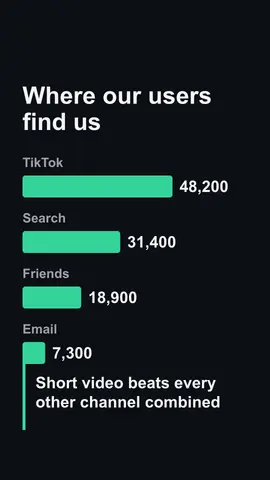

Bar Chart Race Maker FAQ
Start Your Bar Chart Race
Paste your periods and values, let AI write the title for free, check the frames, and render a race where the bars overtake each other. See all AI video templates.
Make a Bar Chart Race