
Daily check-in: 15 free credits · Claim every day for AI images. Credits never expire. Resets at 00:00 UTC.
Animated Bar Chart Video: Turn Numbers into a Data Story
Make an animated bar chart video from three to six numbers: bars grow, values count up, and a one-line takeaway tells viewers what it means. AI writes the title and takeaway for free, and you render a 12-second MP4 in 9:16, 16:9 or 1:1.
0/600
Writing the copy and checking frames are free. Only the final render uses credits.
Your video plays here
Pick a template, describe your video and let AI write the copy. Check the frames, then render.
History
Your rendered videos will show up here.
An Animated Bar Chart Video That Tells One Story
Most charts fail on social video because they show too much. This animated bar chart template shows one comparison of three to six bars, then states the conclusion. Over 12 seconds the title appears, each bar grows to its value while the number counts up beside it, and a takeaway sentence lands at the end so viewers know what to remember. The labels are short, one or two words, so the bar chart stays readable on a phone. You pick one accent color for the bars, and the layout adapts to vertical, wide and square frames, so the same data story works in a Reel, a YouTube video or a LinkedIn post. Each bar is sized against your largest value, so the differences look exactly as large as they are.
Your Numbers, Not Invented Statistics
When you write a brief, include the numbers you want to show, for example traffic by channel or survey results by answer. Write with AI places those values in the bars and writes the title and takeaway for free. It is instructed to use only numbers the brief states or clearly implies and never to invent precise statistics. If your brief has no numbers, it builds a simple ranking with round illustrative values and says so in the takeaway, so nobody mistakes it for real data. You can then type the exact values yourself, from 0 up to one trillion, and add a short unit such as %, k or h.
Counting Values and a Clear Takeaway
Animated numbers hold attention better than a static chart. As each bar grows, its value counts up from zero to the final figure, with your unit appended, so viewers feel the gap between the biggest and smallest bar. The takeaway line of up to 60 characters then gives the one sentence a viewer should repeat to a friend, such as Short video beats every other channel combined. Keep it concrete and it doubles as your caption. If you need to show change over many years instead of one snapshot, the bar chart race maker animates rankings that overtake each other. A unit keeps the numbers short, for example 48k instead of 48,000.
Free Frame Check for Every Animated Bar Chart Video
A free AI frame check renders four stills of the animated bar chart video, at 1.5, 4.5, 8.5 and 11.5 seconds, and looks for labels that collide, a title that wraps too far, or a takeaway that runs off the frame. It shortens the text for you when something does not fit, so the MP4 you pay for matches the preview. You can still edit every field after the check: rename a bar, adjust a value, swap the accent color or rewrite the takeaway. The render costs about 10 credits for the 12-second video, and you can download it as soon as it finishes.
How to Make an Animated Bar Chart Video
- 1
Choose a frame for your bar chart
Pick 9:16 for Shorts, Reels and TikTok, 16:9 for YouTube and slides, or 1:1 for LinkedIn and Instagram feeds. This template needs no photos. You can switch frames later without losing your data. Sign in first, because writing with AI and rendering both need a free account.
- 2
Write the brief with your numbers
Describe what the data shows and include the values. Press Write with AI, and the title, bars, unit and takeaway appear for free. The frame check previews four stills of the animated bar chart and fixes anything that overflows. Prefer to type the data yourself? Fill the bars, unit and takeaway directly. Check every value against your source before the next step.
- 3
Edit the values and render the chart video
Correct any label or number, pick an accent color, and render the 12-second MP4 for about 10 credits. For a counter or ranking alternative, see the other data video templates. The finished MP4 stays in your history, so you can download it again or render an updated version next month.
What Can You Show with an Animated Bar Chart?
Marketing and Growth Results
Share where your users come from, how revenue grew by quarter, or which campaign performed best. A bar chart video with one clear takeaway is easier to post and easier to understand than a screenshot of a dashboard. An animated bar chart video turns a monthly update into a post people actually watch. Render the wide frame for the next team meeting as well.
Survey and Poll Results
Turn the answers to one survey question into a quick visual summary for social media, a newsletter or an internal update. Use % as the unit and let the takeaway name the winning answer. Use the takeaway line to state the main result.
Explainers and Education
Teachers, creators and journalists can compare prices, populations or times in a short data story. Introduce the topic with a kinetic typography video, then show the numbers in the chart.
Product Comparisons
Compare battery life, speed or price across options, with your product highlighted by the takeaway. Follow it with a promo from the product promo video maker that turns the data into a reason to buy. Keep the comparison fair and cite the source in your caption.
Related video templates
All templates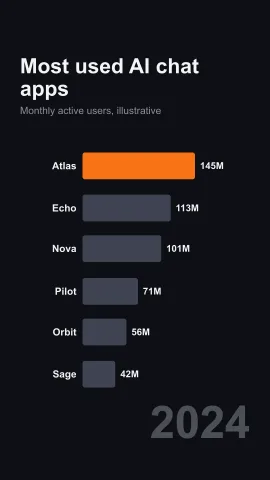

Animated Bar Chart Video FAQ
Turn Your Numbers into an Animated Bar Chart
Paste three to six values, let AI write the title and takeaway for free, check the frames, and render a 12-second MP4. Explore every AI video template for more data formats.
Make a Chart Video