
Daily check-in: 15 free credits · Claim every day. Credits are good until 00:00 UTC, then reset.
GPT Image 2.5 Generator: Sunburst and Flare
GPT Image 2.5 is OpenAI's newest image model, and AgentReel runs both of its versions. Sunburst is the quality model for campaign visuals and careful edits; Flare is the faster one for everyday drafts. Create from a prompt or edit with up to 16 reference photos, and see the price before you click Generate.
- Resolutions: 1K, 2K, 4K
- Up to 16 reference images
- Prompts up to 20,000 characters
- 2–4 credits per image
Last updated
Example images of this model
Real outputs of this model from the homepage showcase, each with the prompt that made it.
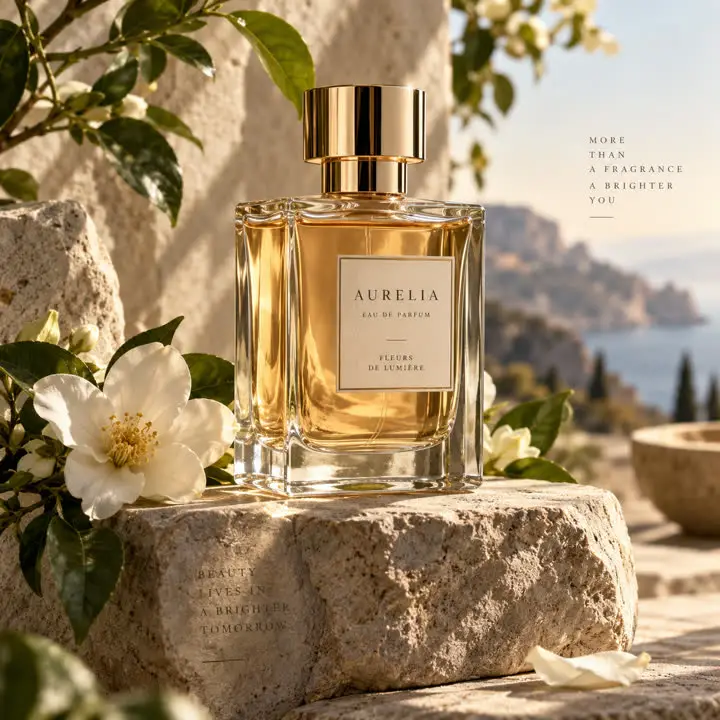
Amber perfume
Prompt: Create a premium fragrance campaign image featuring an elegant transparent perfume bottle filled with pale amber liquid, placed on a textured stone pedestal surrounded by soft white flowers and fresh green leaves. Warm natural light enters from the side, creating realistic reflections through the glass and gentle shadows across the scene. Render the glass thickness, liquid refraction, metallic cap, flower petals, stone texture, and subtle surface imperfections with high visual fidelity. Keep the composition luxurious, balanced, and suitable for a high-end beauty campaign.
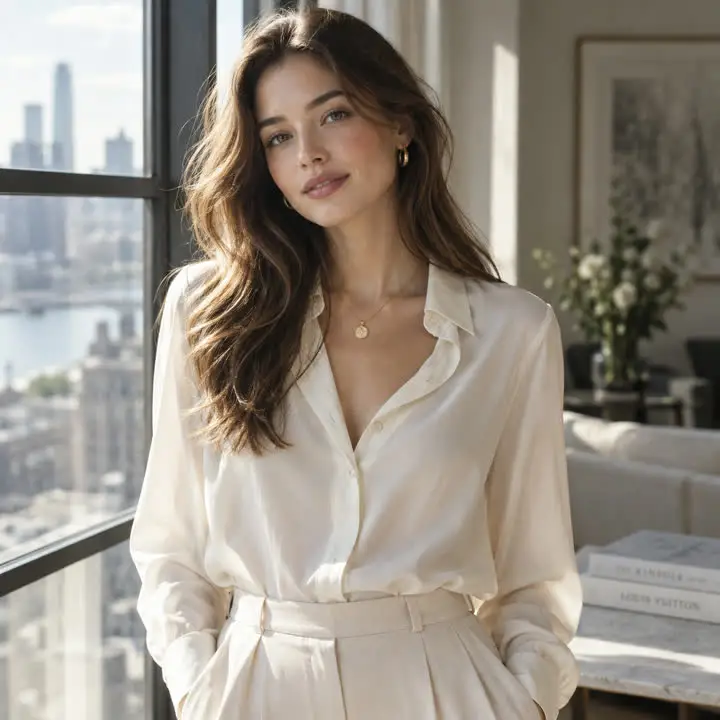
Window light
Prompt: Create a refined editorial portrait of a young woman standing near a large sunlit window in a modern interior. She wears an elegant cream blouse with soft fabric texture and subtle jewelry. Natural daylight creates delicate highlights across her face and hair, while the background falls into a gentle blur. Preserve realistic skin texture, individual hair strands, natural facial proportions, soft fabric folds, and subtle reflected light. The image should feel like a premium fashion editorial photograph rather than an overly retouched AI portrait.
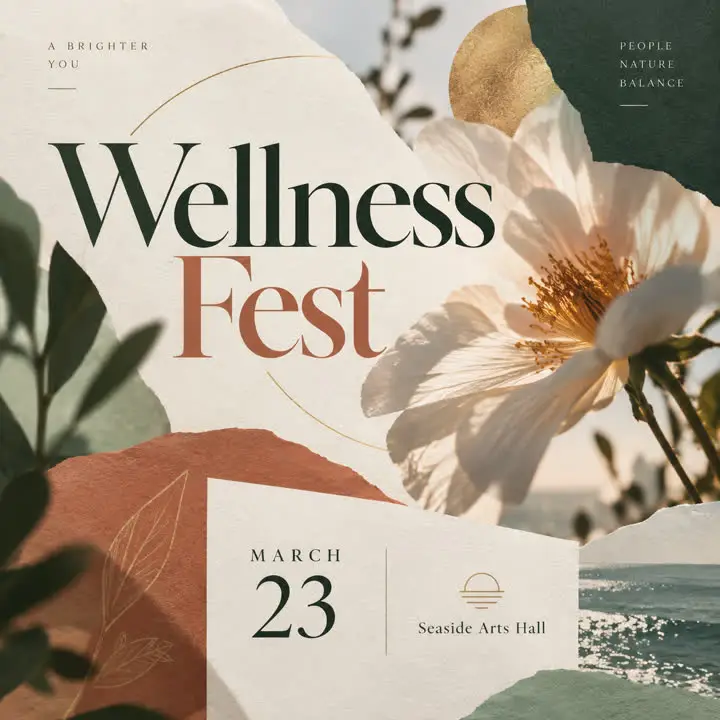
Event poster
Prompt: Create a sophisticated contemporary event poster with a bold central headline area, one strong visual focal point, a clearly separated date and venue section, and carefully organized decorative elements. Use expressive typography, layered paper shapes, abstract photography, and a refined editorial grid. Keep the information hierarchy clear and visually balanced, with strong spacing and no dense blocks of small text. The final design should feel professionally art-directed and ready for a real campaign.
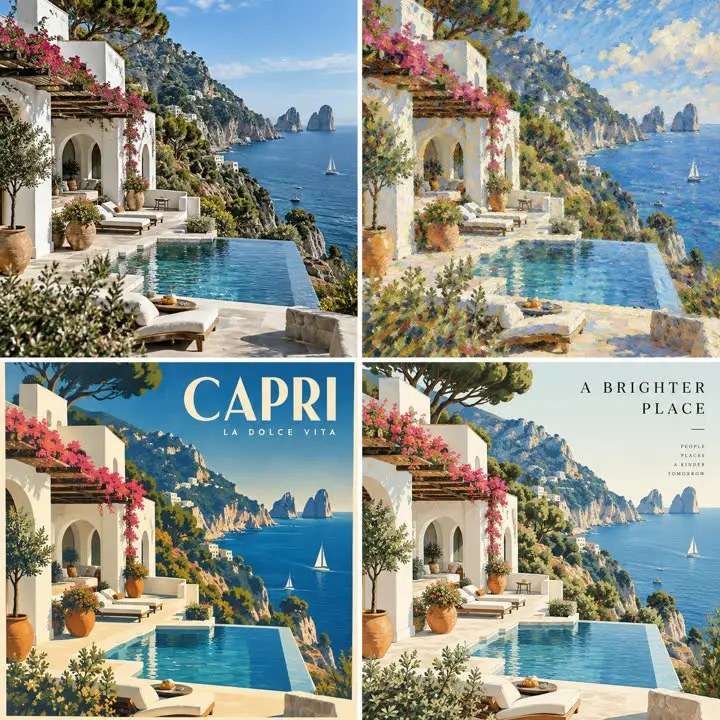
Villa moods
Prompt: Create four interpretations of the same white Mediterranean seaside villa while preserving its architecture, camera angle, terrace layout, surrounding cliffs, and ocean position. Render one version as refined architectural photography, one as an impressionist painting, one as a vintage travel poster, and one as a premium editorial illustration. Each style should feel genuinely distinct while the underlying structure and recognizable scene remain consistent across all versions.
Settings and limits
Read live from the AgentReel model catalog, so this table always matches the generator.
| Developer | OpenAI |
|---|---|
| Type | AI image model |
| Input | Text prompt, or up to 16 reference images |
| Prompt length | Up to 20,000 characters |
| Aspect ratios | auto, 1:1, 3:2, 2:3, 4:3, 3:4, 16:9, 9:16, 21:9 |
| Resolution | 1K, 2K, 4K |
| Credits | 2–4 credits per generation |
Price in credits for every setting
The credit cost of every setting combination. The Generate button always shows the exact price before you spend anything.
| Resolution | Text prompt |
|---|---|
| 1K | 2 |
| 2K | 3 |
| 4K | 4 |
How it compares with the other AI image models
Every model in the same generator, with its developer and credit range. Prices come from the same catalog the generator uses.
| Model | Developer | Credits |
|---|---|---|
| Nano Banana ProPro | 5–6 | |
| Nano Banana 2.1New | 1–3 | |
| Nano Banana 2 | 2–5 | |
| Nano BananaFast | 1 | |
| GPT Image 2.5 Sunburst (This page)New | OpenAI | 2–4 |
| GPT Image 2.5 FlareNew | OpenAI | 2–4 |
| GPT Image 2 | OpenAI | 2–4 |
| GPT Image 1.5 | OpenAI | 1–6 |
| Seedream 5.0 ProHot | ByteDance | 2–4 |
| Seedream 5.0 Lite | ByteDance | 2 |
| Seedream 5.0 FlashFast | ByteDance | 1 |
| Seedream 4.5 | ByteDance | 2 |
| Flux 2 Pro | Black Forest Labs | 2 |
| Z-ImageFast | Alibaba | 3 |
| Flux Kontext | Black Forest Labs | 2–3 |
| Ideogram V3 | Ideogram | 1–3 |
| Qwen Image 3.0 Pro | Alibaba | 2–3 |
| Grok Imagine Image 2.0 | xAI | 1 |
| Wan 2.7 Image Pro | Alibaba | 3 |
| Imagen 4 | 1–3 |
Two versions, one request
Sunburst and Flare take the same prompt, references, frame and size, so you can render one brief on both and keep the better result. Switching is one click in the model picker.
The most references in the generator
Upload up to 16 pictures and say which one supplies what: the product, the face, the room, the colour palette. That is the highest reference limit in our image generator, shared with the rest of the OpenAI family.
1K drafts, 4K finals
Render at 1K, 2K, 4K. A 1K pass costs 2 credits, so you can iterate on wording cheaply and rerun the keeper at 4K for 4 credits.
Frames for every placement
Pick auto, 1:1, 3:2, 2:3, 4:3, 3:4, 16:9, 9:16, 21:9. Auto follows the shape of your first reference, which keeps an edit from cropping the original photo.
How to create an image with Sunburst
Open the generator with Sunburst selected
The button on this page opens the AI image generator with Sunburst preselected. Flare sits next to it in the same picker.
Describe the picture or attach references
Write up to 20,000 characters. For an edit, add up to 16 images and state what must stay unchanged.
Choose frame and resolution
Pick an aspect ratio and 1K, 2K, 4K. The Generate button shows the credit cost first, and a failed task is refunded.
What creators make with it
Beauty and product campaigns
Glass, liquid, metal and fabric are where the quality model earns its keep. Cut the packshot out first with the free background remover, then place it in a styled scene.
Posters with readable text
Quote the exact headline, say where it sits and how large it is. Event posters, sale banners and covers work best when the prompt spells out every word that must appear.
Editorial portraits and lookbooks
Keep one model, outfit and pose across a series by reusing the same reference photos, then resize each frame for its channel with the image resizer.
First frames for video
Render the opening still here and animate it in the AI video generator with a model such as Veo 3.1, or turn a set of stills into a TikTok carousel.
Sunburst vs Flare: a practical guide
What OpenAI says about the two versions
OpenAI's image prompting guide describes Flare as the small model, tuned for speed, with picture quality comparable to GPT Image 2, and Sunburst as the base model, tuned for quality, with higher picture quality than GPT Image 2. Both improve precise editing and keeping a subject intact across edits. Source: developers.openai.com, Image prompting guide, read on 2 November 2026.
OpenAI's own advice is to start on Sunburst when quality is the priority, then test the same prompts on Flare and move over if Flare also meets your bar. That is easy here, because both run from the same form.
Which one to pick
Choose Sunburst for the hero image of an ad, a landing page or a print piece, and for edits where small details matter: the keys on an instrument, the cap on a perfume bottle, a logo on fabric. Choose Flare for brainstorming, social posts and long batches of variations where turnaround counts more than the last bit of polish.
A routine that works: explore ten directions with Flare, keep the prompt that wins, then render the final on Sunburst at 2K or 4K.
Writing prompts for the 2.5 models
Lead with the subject and the use: a premium fragrance ad, an event poster, an editorial portrait. Then give light, camera and material details. Long prompts are fine, so list what matters rather than stacking adjectives.
For edits, separate the change from what must stay the same: keep the face, pose and outfit, replace the street with a beach at noon, match the warm light. When you attach several references, name them by order, such as the bottle from image 1 and the marble counter from image 2.
How it compares with other image models
Nano Banana Pro, the default model, takes up to eight references and offers more frames; Nano Banana 2.1 is the low-cost option for drafts and wide banner strips. The OpenAI line is the one to use when a single picture must combine many sources. The comparison table on this page lists every model in the generator side by side, and the model library has a guide for each one.
What an image costs
2 to 4 credits per image, set by the resolution; the full table is above. Credits come from a plan or credit pack, and the credits and pricing guide explains how balances work. Free credits cover Z-Image, video templates and Code to Video, not this model.
Where to use it
AI image generatorPick GPT Image 2.5 Sunburst in the model menu, write a prompt, add reference images if you want and generate.Related models
Frequently asked questions
What is GPT Image 2.5?
How much does Sunburst cost on AgentReel?
Is it free to use?
Can I edit my own photos?
Which aspect ratios are available?
Should I use Sunburst or Flare?
Where do my images go?
Try OpenAI's newest image model
Open the image generator with Sunburst selected, compare it with Flare on the same prompt, and see the price before you generate.
Open the image generator