
Daily check-in: 15 free credits · Claim every day. Credits are good until 00:00 UTC, then reset.
MiniMax H3 AI Video Generator
Create MiniMax H3 videos up to 2K from a text prompt or from a first and last frame. AgentReel runs the model in your browser with six aspect ratios and shows the credit price before every clip.
- Durations: 6s, 10s, 15s
- Resolutions: 768p, 2k
- Aspect ratios: 16:9, 9:16, 1:1, 4:3, 3:4, 21:9
- 12–49 credits per clip
Last updated
Example clips made on AgentReel
Real generations from the showcase, each with the prompt that made it.
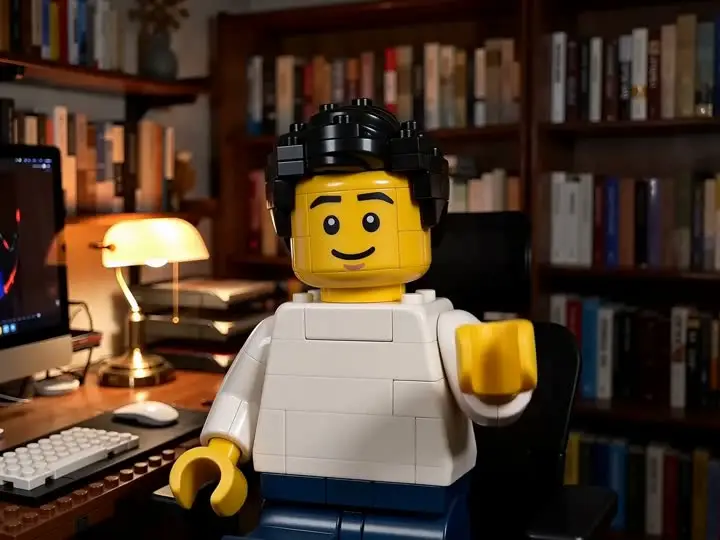
Lego world
Prompt: Transform the entire video into a vibrant Lego world. The person, the desk, and every object in the room should be constructed from high-quality plastic Lego bricks. Keep the original waving motion and spatial layout perfectly. The lighting should be bright and clean, like a professional Lego toy commercial.
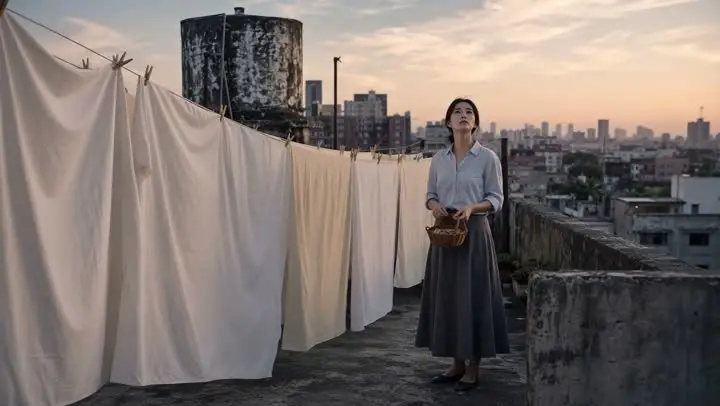
Rooftop
Prompt: Animate the source image into a 12-second restrained cinematic rooftop scene. Preserve the woman’s face, tied shoulder-length hair, pale blue shirt, charcoal-gray skirt, flat shoes, woven basket, rooftop architecture, clotheslines, fabric colors, and evening lighting. [0–3 seconds] Begin almost still. A light breeze moves loose strands of her hair, the lower edge of her skirt, and the corners of the hanging bedsheets. She looks upward slightly while holding the basket naturally at waist level. [3–7 seconds] A stronger gust travels across the rooftop from left to right. The nearest sheets lift first, followed by the fabric rows farther behind, creating a clear sequence of physically connected motion. She steadies the basket with one hand and reaches toward a sheet that has loosened from one clothespin. [7–10 seconds] Track gently beside her as she takes several natural steps through the narrow passage between the hanging sheets. One sheet briefly moves across the foreground and partially obscures the camera, then lifts away to reveal her again. Preserve correct spatial relationships and prevent her body from passing through the fabric. [10–12 seconds] She reaches the clothesline, pulls the loose corner into place, and secures it with a wooden clothespin. The wind gradually softens. Warm evening light passes through the fabric and falls across her face as the sheets settle into slower movement. Audio: rooftop wind, fabric flutter, distant city ambience, soft footsteps, wooden clothespins touching inside the basket, and a minimal original acoustic score. Keep the woman’s identity, clothing, basket, architecture, fabric placement, and lighting consistent. Maintain natural walking, hand movement, cloth weight, wind direction, and foreground occlusion. No dialogue, text, logos, product placement, sudden weather changes, duplicated fabric, floating clothespins, body distortion, fabric passing through the subject, changing buildings, rapid camera movement, or dramatic fantasy effects.
Settings and limits
Read live from the AgentReel model catalog, so this table always matches the generator.
| Developer | MiniMax |
|---|---|
| Type | AI video model |
| Input | Text prompt, or up to 2 reference images |
| Prompt length | Up to 7,000 characters |
| Aspect ratios | 16:9, 9:16, 1:1, 4:3, 3:4, 21:9 |
| Resolution | 768p, 2k |
| Duration | 6s, 10s, 15s |
| Credits | 12–49 credits per generation |
Price in credits for every setting
The credit cost of every setting combination. The Generate button always shows the exact price before you spend anything.
| Resolution | Duration | Text prompt | With 1 image | With 2 images |
|---|---|---|---|---|
| 768p | 6s | 12 | 13 | 14 |
| 768p | 10s | 20 | 21 | 22 |
| 768p | 15s | 30 | 31 | 32 |
| 2k | 6s | 20 | 21 | 22 |
| 2k | 10s | 33 | 34 | 35 |
| 2k | 15s | 49 | 50 | 51 |
How it compares with the other AI video models
Every model in the same generator, with its developer and credit range. Prices come from the same catalog the generator uses.
| Model | Developer | Credits |
|---|---|---|
| Veo 3.1Pro | 8–93 | |
| Seedance 2.5New | ByteDance | 35–593 |
| Kling 3.0Hot | Kuaishou | 11–102 |
| Kling 3.0 Omni | Kuaishou | 18–87 |
| Gemini Omni Video | 16–53 | |
| Gemini Omni 1.1 FlashNew | 16–53 | |
| Seedance 2.0 | ByteDance | 24–383 |
| Wan 3.0New | Alibaba | 10–120 |
| Runway | Runway | 3–8 |
| MiniMax H3 (This page) | MiniMax | 12–49 |
| Hailuo 2.3 | MiniMax | 8–23 |
| Wan 3.0 Prime | Alibaba | 16–189 |
| Kling 3.0 TurboFast | Kuaishou | 23–85 |
| Seedance 2.0 FastFast | ByteDance | 15–93 |
| PixVerse V6 | PixVerse | 7–69 |
| HappyHorse 1.1 | HappyHorse | 29–109 |
| Vidu Q4 | Vidu | 9–77 |
| Wan 2.7 | Alibaba | 20–90 |
| Grok Imagine Video 1.5 | xAI | 4–17 |
| Grok Imagine VideoFast | xAI | 4–30 |
Up to 2K resolution
MiniMax H3 renders at 768p, 2k. The 768p setting is the default and the economical choice for drafts and social clips; 2K gives a noticeably larger frame for final renders, websites and big screens, at a higher rate per second.
Six aspect ratios for text-to-video
Without images you choose from 16:9, 9:16, 1:1, 4:3, 3:4, 21:9: landscape and vertical, square for feeds, 4:3 and 3:4 for classic and portrait framing, and 21:9 for a wide cinematic frame.
Text-to-video or image-to-video
Write a prompt and the model runs as text-to-video. Upload one image as the first frame, or 2 images as the first and the last frame, and it switches to image-to-video and animates from your pictures.
Clear, predictable pricing
The price is a per-second rate set by the resolution, times the duration you pick. Each uploaded image adds a small fixed amount, and the price table on this page shows the text-only and the with-image prices side by side.
How to make a MiniMax H3 video
Open the generator with the model selected
Click the button on this page; the AI video generator opens with the model already selected.
Write the prompt, add frames
Describe the shot in up to 7,000 characters and optionally upload a first frame, or a first and last frame.
Choose settings and generate
Pick resolution (768p, 2k), duration (6s, 10s, 15s) and, for text-to-video, an aspect ratio. The Generate button shows the exact price.
What it is good for
High-resolution hero shots
Render the opening shot of a site, a trailer or a presentation at 2K so it stays sharp on large screens.
Widescreen and cinematic frames
Use 21:9 for title sequences, landscapes and moody establishing shots, then cut them into your edit with the B-roll editor.
Animating designs and photos
Start from an image made in the AI image generator, or from a product photo, and describe the motion you want.
Longer single shots
The longest duration gives a slow camera move or a continuous action enough time to play out in one clip.
MiniMax H3 guide: prompts, frames and cost
Writing a prompt that works
Write one shot per prompt. Describe the subject, what it does, where it is, how the camera moves and how the scene is lit: "a lighthouse on a cliff during a storm, waves crashing below, slow aerial orbit, lightning in the distance, cold blue light". Specific nouns and verbs give the model more to work with than general adjectives.
The prompt can be up to 7,000 characters long. Use that room for precision about the one shot you want, not to describe several scenes. A sequence is better made as separate clips and joined in the AI video editor, or planned and generated for you by the video agent.
Camera terms make a clear difference: close-up, wide, aerial, tracking, dolly in, slow pan. Put the camera move near the start of the prompt if it is the point of the shot.
Describing light and style
Light does more for the look of a clip than any style label. Name the source and the time of day, such as low winter sun, overcast noon, candlelight or neon signs at night, and say where it falls on the subject. A short colour note like "warm amber highlights, deep teal shadows" is easier to follow than the name of a film or a director.
Keep style words consistent and few. Two or three well chosen ones, for example "35mm film grain, shallow depth of field", give a clear direction; ten competing ones cancel each other out. When a result looks wrong, remove words before you add new ones.
Image-to-video with first and last frames
With a first frame, the clip opens exactly on your picture: subject, composition and colours. With a last frame as well, MiniMax H3 animates from one picture to the other, which is the most reliable way to land a shot where you want it.
Keep both pictures the same size and shape, keep the subject in a similar position and describe the movement between them. Prepare images with the free image tools, for example the image cropper to set the frame before you upload. Remember that each uploaded image adds a little to the price.
768p or 2K?
Use 768p while you are still shaping the prompt. It costs less per second and shows you the framing, the motion and the timing. When a take works, render it again at 2K for the version you will publish.
2K is worth it when the clip will be seen large: a website header, a presentation on a projector, a trailer. For phone-first social video, 768p is often enough.
Whatever the resolution, judge a draft on its motion first. Sharpness can be bought later with a higher setting, but a camera move that goes the wrong way or an action that ends too early will look just as wrong at 2K.
Choosing a duration
MiniMax H3 offers 6s, 10s, 15s. Choose by the action: a gesture or a reveal fits the shortest length, a walk, a long camera move or a slow transformation needs more time. Because the price is per second, the duration is the setting that changes the cost most at a given resolution.
Longer clips also give the model more room to drift from the prompt. If a long clip goes wrong halfway, try two shorter clips joined in the editor instead.
Building a consistent series
For several clips that must look like one series, keep the same words for light, colour and camera in every prompt and change only the subject and the action. Starting each clip from images that share a look keeps characters and products consistent from shot to shot.
Review drafts at 768p side by side before rendering the finals at 2K. Fixing a prompt early is far cheaper than re-rendering a whole batch at full resolution.
What a clip costs
On AgentReel a clip costs 12 to 49 credits without images, depending on resolution and duration; uploaded images add a small amount each. Every combination is in the table on this page, the Generate button shows the exact price before you spend anything, and a failed clip is refunded automatically.
Credits come from a plan or credit pack. Free credits cover Z-Image, video templates and Code to Video only, so this model needs paid credits. The credits and pricing guide explains how credits work.
How it compares with other models
The comparison table above lists every model in the generator. Among the models with a guide, Veo 3.1 goes up to 4K and always generates sound, Kling 3.0 has a sound switch and the most clip lengths, and Seedance 2.5, Seedance 2.0 and Wan 3.0 generate sound with every clip at up to 1080p.
MiniMax also makes Hailuo 2.3, which you can pick in the same AI video generator. The model overview lists every model with its price range.
Where to use it
AI video generatorPick MiniMax H3 in the model menu, write a prompt, add frames if you want and generate.Related models
MiniMax H3 FAQ
What is MiniMax H3?
How much does MiniMax H3 cost?
Is MiniMax H3 free?
What resolution does MiniMax H3 support?
Which aspect ratios can I choose?
How long can a MiniMax H3 clip be?
How many images can I upload?
How long can the prompt be?
Where do my videos go?
Generate a MiniMax H3 video
Open the generator with MiniMax H3 selected and see the price before you click. Or compare the other AI video models.
Generate with MiniMax H3