
Daily check-in: 15 free credits · Claim every day. Credits are good until 00:00 UTC, then reset.
Seedance 2.0 AI Video Generator
Create Seedance 2.0 clips with sound from a prompt or from your own frames, in six aspect ratios and three resolutions. AgentReel runs ByteDance's Seedance 2.0 in your browser and shows the credit price before every clip.
- Durations: 5s, 10s, 15s
- Resolutions: 480p, 720p, 1080p
- Six aspect ratios, 21:9 included
- 24–383 credits per clip
Last updated
Example clips made on AgentReel
Real generations from the showcase, each with the prompt that made it.
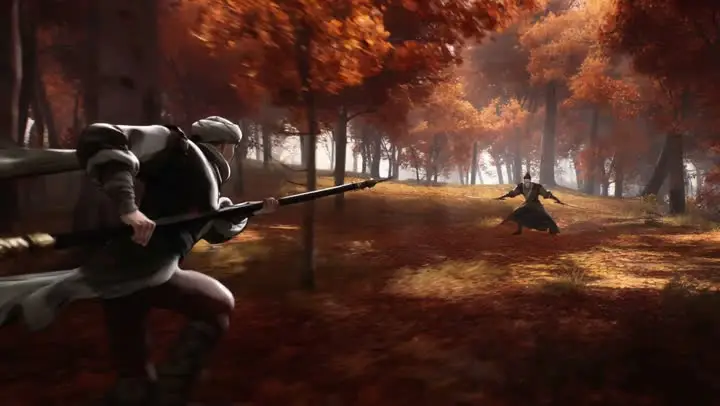
Spear duel
Prompt: Reference @Image1 @Image2 for the spear-wielding character, @Image3 @Image4 for the scene. Generate a martial arts action sequence where the character performs fluid spear techniques. Use multi-angle tracking shots to capture the power and beauty of martial arts.
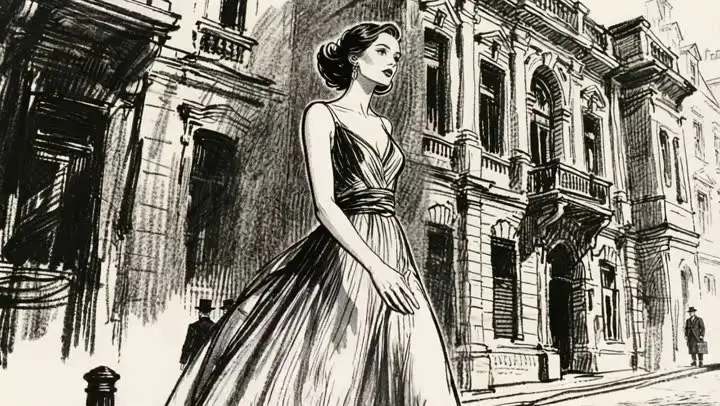
London gust
Prompt: The camera slightly pulls back to reveal a full view of the street and follows the female lead as she moves. The wind flutters her skirt as she walks down a 19th-century London street. As she continues walking, a steam car drives up from the right side of the street, quickly passing by her. The wind lifts her skirt, and with a shocked expression on her face, she hurriedly uses both hands to hold it down. Background sounds include footsteps, crowd noise, car noises etc.
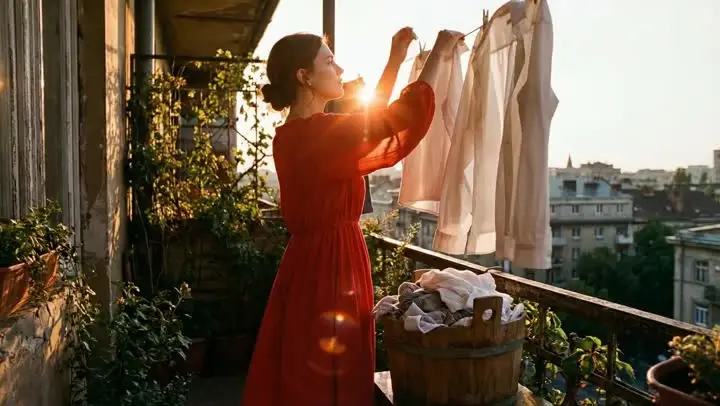
Laundry day
Prompt: Fixed camera shot, a girl is elegantly hanging clothes to dry. After one piece is hung, she takes another from the bucket and gives it a vigorous shake.
Settings and limits
Read live from the AgentReel model catalog, so this table always matches the generator.
| Developer | ByteDance |
|---|---|
| Type | AI video model |
| Input | Text prompt, or up to 2 reference images |
| Prompt length | Up to 20,000 characters |
| Aspect ratios | 16:9, 9:16, 1:1, 4:3, 3:4, 21:9 |
| Resolution | 480p, 720p, 1080p |
| Duration | 5s, 10s, 15s |
| Credits | 24–383 credits per generation |
Price in credits for every setting
The credit cost of every setting combination. The Generate button always shows the exact price before you spend anything.
| Resolution | Duration | Text prompt |
|---|---|---|
| 480p | 5s | 24 |
| 480p | 10s | 48 |
| 480p | 15s | 72 |
| 720p | 5s | 52 |
| 720p | 10s | 103 |
| 720p | 15s | 154 |
| 1080p | 5s | 128 |
| 1080p | 10s | 255 |
| 1080p | 15s | 383 |
How it compares with the other AI video models
Every model in the same generator, with its developer and credit range. Prices come from the same catalog the generator uses.
| Model | Developer | Credits |
|---|---|---|
| Veo 3.1Pro | 8–93 | |
| Seedance 2.5New | ByteDance | 35–593 |
| Kling 3.0Hot | Kuaishou | 11–102 |
| Kling 3.0 Omni | Kuaishou | 18–87 |
| Gemini Omni Video | 16–53 | |
| Gemini Omni 1.1 FlashNew | 16–53 | |
| Seedance 2.0 (This page) | ByteDance | 24–383 |
| Wan 3.0New | Alibaba | 10–120 |
| Runway | Runway | 3–8 |
| MiniMax H3 | MiniMax | 12–49 |
| Hailuo 2.3 | MiniMax | 8–23 |
| Wan 3.0 Prime | Alibaba | 16–189 |
| Kling 3.0 TurboFast | Kuaishou | 23–85 |
| Seedance 2.0 FastFast | ByteDance | 15–93 |
| PixVerse V6 | PixVerse | 7–69 |
| HappyHorse 1.1 | HappyHorse | 29–109 |
| Vidu Q4 | Vidu | 9–77 |
| Wan 2.7 | Alibaba | 20–90 |
| Grok Imagine Video 1.5 | xAI | 4–17 |
| Grok Imagine VideoFast | xAI | 4–30 |
The budget pick of the Seedance family
Seedance 2.0 takes exactly the same settings as Seedance 2.5 and costs fewer credits per second at every resolution. That makes it the natural choice for prompt tests, storyboards, batches of social clips and any project where you need many takes rather than one perfect shot.
Audio generated with the picture
Every clip from this model on AgentReel comes with sound. Put the ambience, the effects or the music in the prompt and the soundtrack is generated together with the video, ready to post or to replace later in an editor.
Frames for control
Run it as text-to-video, or upload up to 2 images: one fixes the first frame, two fix the first and the last frame. With frames the clip adapts to the shape of your images, which keeps products, logos and characters looking the way you designed them.
Every common format
Choose from 16:9, 9:16, 1:1, 4:3, 3:4, 21:9 for text-to-video. Vertical for Shorts and Reels, square for the feed, widescreen for YouTube and 21:9 for a cinematic look all come from the same model and the same prompt box.
How to make a Seedance 2.0 video
Open the generator
Click the button on this page; the AI video generator opens with Seedance 2.0 already selected.
Prompt and frames
Describe the shot in up to 20,000 characters and, if you like, upload a first frame or a first and last frame.
Settings and price
Pick ratio, resolution and duration. The Generate button shows the exact price; the finished clip appears in your library.
Where it fits
Drafting before the final render
Test framing, motion and sound cheaply, then render the chosen prompt again with Seedance 2.5 or another model if you want to compare.
Batches of social content
Make a week of short vertical clips at 480p or 720p without spending a large share of your credits. Add captions and music in the AI video editor.
Animated storyboards
Turn panels made in the AI image generator into moving shots by using them as first and last frames.
B-roll for talking videos
Generate cutaways that match what you talk about, then drop them into your edit with the B-roll editor.
Seedance 2.0 guide: prompts, frames and cost
Writing a prompt that works
Treat the prompt as a description of one shot. Say who or what is in frame, what happens, where it is, how the camera moves and what we hear: "steam rises from a bowl of ramen on a wooden counter, close-up slowly pulling back, warm light, quiet restaurant chatter". Every part of that sentence is something the model can render.
Put the most important element first. If the subject matters most, start with it; if the camera move is the point of the shot, lead with the move. Keep one main action per clip and generate a sequence as separate clips.
The prompt box takes up to 20,000 characters, so there is room for detail. Use it to be precise about one action rather than to describe several scenes at once.
A cheap draft loop
The fastest way to a good clip is several quick attempts. Start at 480p with the shortest duration, change one thing in the prompt at a time and watch what moves. When the framing and the motion are right, raise the resolution and the length for the final version.
Because the per-second rate is low at 480p, a handful of drafts often costs less than one full-quality render on a premium model. The price table on this page lists every combination, so you can plan a draft budget before you begin.
Frames that work
A good first frame is sharp, well lit and already composed the way the shot should open. For a last frame, keep the same size and shape and the subject in a similar place, then describe the movement between the two pictures. The closer the two frames, the more predictable the motion.
If your images need work, crop, upscale or clean them up first with the free image tools. A clean source picture shows in every frame of the clip.
Making the sound work for you
Describe sound inside the action it belongs to: "a door slams and the dog starts barking" ties the sound to the moment it should happen. Keep it to one or two clear sources plus a general ambience.
If the video will carry narration or a licensed track, treat the generated audio as a placeholder and replace it in the AI video editor.
Planning a batch of clips
When you need many clips, such as a month of social posts or a set of cutaways for a long video, write the prompts first in a simple list. Give each one the same style words for light, colour and camera so the finished clips look like they belong together, and change only the subject and the action.
Generate the whole list at a low resolution, review it in one sitting and regenerate only the clips that miss. Then render the keepers at the resolution you will publish. This keeps the cost predictable and the look consistent across the batch.
Product videos
For a product, the first frame does most of the work. Use a clean photo on a simple background, upload it as the first frame and describe one movement: a slow turn, a push in, a hand reaching for it. Keep text and logos large in the photo, because small print is the hardest detail for any video model to keep sharp.
If you need a complete advert rather than a single shot, the AI video ad generator writes the script, picks the shots and adds a voice for you.
What a clip costs
On AgentReel a clip costs 24 to 383 credits. The price is a per-second rate set by the resolution, times the duration, and the table on this page lists every combination. The Generate button shows the exact price before you spend anything, and a failed clip is refunded automatically.
Credits come from a plan or credit pack. Free credits cover Z-Image, video templates and Code to Video only, so this model needs paid credits. The credits and pricing guide explains the details.
How it compares with other models
Against Seedance 2.5, the settings are identical and the price is lower; 2.5 is the newer model. Wan 3.0 starts even lower but has five aspect ratios instead of six. Veo 3.1 goes up to 4K, Kling 3.0 adds a sound switch and more clip lengths, and MiniMax H3 renders up to 2K.
All of these sit in the same AI video generator, so comparing them on one prompt is a matter of switching the model menu. The model overview has a page for each.
Where to use it
AI video generatorPick Seedance 2.0 in the model menu, write a prompt, add frames if you want and generate.Related models
Seedance 2.0 FAQ
What is Seedance 2.0?
How much does Seedance 2.0 cost?
Is Seedance 2.0 free?
Is Seedance 2.0 cheaper than Seedance 2.5?
Which aspect ratios are available?
How long can a clip be?
Does it generate sound?
How many images can I upload?
How long can the prompt be?
Where are my videos saved?
Start with Seedance 2.0
Open the generator with the model selected and see the price before you click. Or compare the other AI video models.
Generate with Seedance 2.0