
Daily check-in: 15 free credits · Claim every day. Credits are good until 00:00 UTC, then reset.
Wan 3.0 AI Video Generator
Make Wan 3.0 videos with sound from a prompt or from a first and last frame. AgentReel runs Alibaba's the model in your browser, with five aspect ratios, three resolutions and the credit price shown before every clip.
- Durations: 5s, 10s, 15s
- Resolutions: 480p, 720p, 1080p
- Aspect ratios: 16:9, 9:16, 1:1, 4:3, 3:4
- 10–120 credits per clip
Last updated
Example clips made on AgentReel
Real generations from the showcase, each with the prompt that made it.
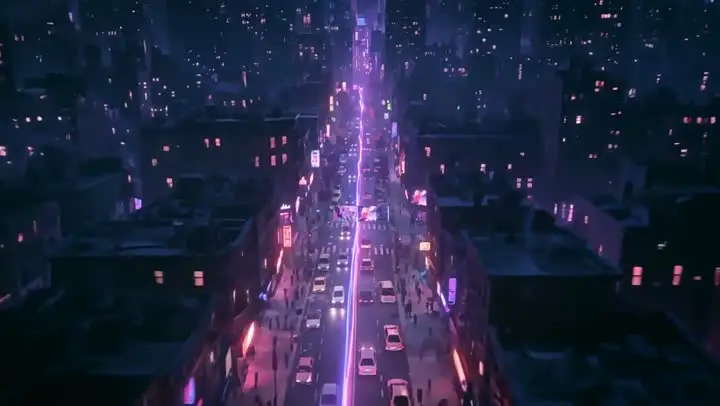
Midnight chase
Prompt: Generate an approximately 30-second, 16:9 horizontal high-aesthetic urban MG chase short film. Image1 @Image1 is used as the reference for the city space, neon atmosphere, road structure, and overall visual texture; Image2 @Image2 is the only reference for the male character appearance; Image3 @Image3 is the only reference for the female character appearance. Strictly maintain the consistency of both characters' faces, hairstyles, body shapes, clothing structures, color palettes, and visual identity. 【Overall Style】 High-end motion graphics dynamic illustration style, combining flat MG graphic language, refined 2.5D spatial layering, and restrained 3D volume. The overall style should not be a realistic live-action film, not childish cartoon style, and not messy heavy industrial cyberpunk. The atmosphere should be stylish, cool, beautiful, tense, and eye-catching, like an action-movie-level urban chase promotional short film. The camera language should heavily use handheld tracking shots, rapid whip pans, snap zooms, low-angle ground-level shots, backward tracking shots, whip transitions, and occasional drone wide shots, creating a strong sense of pursuit pressure. 【Character Action Logic】 The female character's advantage is lightness, speed, agility, and using the environment and route changes to escape. The male character's advantage is strength, prediction, pressure, and interception ability. Both characters are martial arts experts, so the confrontation should not be chaotic grabbing, but a battle around the glowing ball involving "grabbing, blocking, redirecting force, switching hands, using momentum, turning, dodging, and counterattacking." The female character often uses turning movements, force redirection, route changes, and environmental obstacles to create distance; the male character often uses early positioning, wrist interception, body blocking, route sealing, and close-range suppression. 【Glowing Ball】 The glowing ball can be held in one hand, with a white core and soft purple-pink-blue halo. It is the only target being fought over throughout the entire film. The glowing ball should realistically illuminate the hands, facial edges, clothing, and surrounding environment. There is always only one glowing ball. Its size remains consistent. It never duplicates, disappears, or deforms. During movement, it only creates short, clean light trails. 【0.0-4.0 seconds | City traversal and female character introduction】 The camera begins with a high-speed flight through a city nightscape, passing through skyscrapers, neon signs, and road lights, then diving along the main road into the urban district, crossing traffic, and rapidly lowering to street level. As the camera suddenly stops, the female character rushes into frame from the side, tightly holding the glowing ball. First show a series of fast close-up shots: footsteps, the hand gripping the ball, her backward glance, and her forward-running upper-body posture. She is not casually running; she is clearly escaping, quickly observing both the route ahead and behind her, showing that she knows someone is chasing her. 【4.0-8.0 seconds | Male interception, first close-range confrontation】 When the female character enters a narrow street passage, the male character cuts in from another route ahead, showing that he is not blindly chasing but predicting and intercepting. After seeing the male character, the female character does not stop immediately. Instead, she attempts to diagonally change direction and bypass him. The male character immediately reaches out and grabs the wrist holding the glowing ball, with the clear goal of taking the ball. The female character instantly pulls her arm back to protect the ball, while using the pulling force to rotate her body around the outside of his grabbing hand, creating the first force-redirection movement. The male character immediately switches his other hand toward the ball route and uses his shoulder to block her escape path. The female character lowers her center of gravity, slides underneath his arm, and before escaping position, lightly blocks his chest with her forearm to create half a step of space. The male character catches up again and briefly touches the ball but fails to secure it. The camera stays close to both characters, using handheld close-ups, rapid zooms, and small circular movements, always focusing around the glowing ball and hand movements. Finally, the female character performs a fast turn to escape the male character and continues running forward. 【8.0-13.0 seconds | Entering the crowd, female character uses the environment】 The female character rushes into a crowded area. She does not run randomly, but intentionally chooses a complex environment because she is more agile than the male character. She first moves sideways between two pedestrians, then uses roadside stalls and railings to quickly change direction, making it difficult for the male character to approach directly. The male character continues chasing through the crowd without slowing down, occasionally pushing through shoulders to create pressure. The camera mainly uses wide-angle handheld close-follow shots. The frame can be briefly blocked by pedestrians, creating a realistic chaotic feeling. At one point, the male character grabs the back of the female character's coat. The female character does not pull backward forcefully. Instead, she uses the pulling force to rotate sideways, redirects the force, then uses her elbow to push away his forearm before slipping past his side. The two have their second close confrontation inside the crowd: the male character grabs the female character's forearm with one hand and reaches for the glowing ball with the other. The female character raises the ball-holding hand to avoid the grab, locks his wrist with her other hand, rotates her body in the opposite direction, and uses momentum to pull him slightly off balance. The female character slips away from his side and escapes again. 【13.0-16.5 seconds | Entering traffic, switching to bicycles】 After escaping the crowd, the female character reaches the edge of the main road. She realizes continuing on foot will allow the male character to catch up, so she immediately changes transportation. She grabs the handlebar of a bicycle parked nearby and uses her forward momentum to jump onto it, immediately beginning to ride without stopping. The male character exits moments later, quickly grabs another bicycle and continues the pursuit. Use a brief wide shot to establish the space: city skyscrapers, main roads, traffic flow, and both characters' routes. Then immediately return to a low-angle perspective and enter a high-speed bicycle chase. 【16.5-24.0 seconds | Bicycle chase through traffic and third confrontation】 The female character's cycling route is more flexible. She rides close to cars, changes lanes, leans the bicycle, and cuts diagonally through traffic gaps to create distance. The male character's route is more direct and aggressive, constantly reducing the straight-line distance. The camera alternates between ground-level tracking shots, backward tracking shots, high-speed side movements, and brief aerial perspectives. The traffic should react realistically to the chase: when the characters pass near car fronts, vehicles brake suddenly, lights turn on, horns sound, and drivers slightly avoid them, creating a sense of danger. During the bicycle chase, the male character first reaches side-by-side and reaches for the glowing ball. The female character does not immediately pull away. Instead, she intentionally keeps the ball slightly outward for half a beat, causing the male character to extend his body further. When his balance shifts, the female character suddenly leans the bicycle and changes direction, causing him to miss. During the second approach, the male character becomes smarter. He uses a slowing vehicle to block the female character's escape route, then approaches from the side rear and almost grabs her wrist holding the ball. This time the female character does not resist directly. She quickly switches the ball to the other hand, uses the bicycle handlebar for a half-turn movement, and slides away from the male character's reach. The two bicycles nearly collide. The camera should create strong speed and danger. 【24.0-27.5 seconds | Final pressure and female escape】 The traffic becomes more complicated at the intersection ahead. The male character uses his straight-line speed advantage again and nearly reaches the female character's shoulder from behind. The female character notices a large bus crossing horizontally and a line of suddenly stopping vehicles, instantly recognizing an escape opportunity. She intentionally maintains her original route to keep the male character locked onto her position. When he gets close, she suddenly leans the bicycle and cuts through the narrow gap between the front of a braking car and the bus. The male character reacts slightly slower and is forced to slow down and detour because of the angle between the car and bus. The camera quickly pans and becomes completely blocked by the side of the bus, creating a natural transition. 【27.5-30.0 seconds | Ending】 After the bus passes, the male character rushes out but discovers that the female character has already created distance. In the distant neon street corner, only a rapidly moving glowing ball remains visible. The camera quickly pushes toward the distance. The female character briefly looks back in the deeper neon street, showing a slightly proud and relaxed expression, then continues riding away with the glowing ball. Finally, the camera slowly rises and pulls away, revealing the busy night city, continuous traffic flow, and the disappearing light point in the distance. The female character successfully escapes. 【Camera Movement Requirements】 70% of the entire film should have handheld camera feeling. Do not make it overly stabilized. Close-range confrontation scenes should mainly use handheld shots, rapid push-ins and pull-outs, and small circular movements. Crowd chase scenes should strengthen obstruction, blocking, and breathing rhythm. Traffic chase scenes should emphasize low-angle shots, opposing movement, rapid zooms, and sudden braking atmosphere. Wide shots are only used to establish space and provide pacing breaks. The camera should always serve the ownership of the glowing ball, the distance between the two characters, and the direction of pursuit. Do not add meaningless flashy rotations.
Settings and limits
Read live from the AgentReel model catalog, so this table always matches the generator.
| Developer | Alibaba |
|---|---|
| Type | AI video model |
| Input | Text prompt, or up to 2 reference images |
| Prompt length | Up to 20,000 characters |
| Aspect ratios | 16:9, 9:16, 1:1, 4:3, 3:4 |
| Resolution | 480p, 720p, 1080p |
| Duration | 5s, 10s, 15s |
| Credits | 10–120 credits per generation |
Price in credits for every setting
The credit cost of every setting combination. The Generate button always shows the exact price before you spend anything.
| Resolution | Duration | Text prompt |
|---|---|---|
| 480p | 5s | 10 |
| 480p | 10s | 20 |
| 480p | 15s | 30 |
| 720p | 5s | 20 |
| 720p | 10s | 40 |
| 720p | 15s | 60 |
| 1080p | 5s | 40 |
| 1080p | 10s | 80 |
| 1080p | 15s | 120 |
How it compares with the other AI video models
Every model in the same generator, with its developer and credit range. Prices come from the same catalog the generator uses.
| Model | Developer | Credits |
|---|---|---|
| Veo 3.1Pro | 8–93 | |
| Seedance 2.5New | ByteDance | 35–593 |
| Kling 3.0Hot | Kuaishou | 11–102 |
| Kling 3.0 Omni | Kuaishou | 18–87 |
| Gemini Omni Video | 16–53 | |
| Gemini Omni 1.1 FlashNew | 16–53 | |
| Seedance 2.0 | ByteDance | 24–383 |
| Wan 3.0 (This page)New | Alibaba | 10–120 |
| Runway | Runway | 3–8 |
| MiniMax H3 | MiniMax | 12–49 |
| Hailuo 2.3 | MiniMax | 8–23 |
| Wan 3.0 Prime | Alibaba | 16–189 |
| Kling 3.0 TurboFast | Kuaishou | 23–85 |
| Seedance 2.0 FastFast | ByteDance | 15–93 |
| PixVerse V6 | PixVerse | 7–69 |
| HappyHorse 1.1 | HappyHorse | 29–109 |
| Vidu Q4 | Vidu | 9–77 |
| Wan 2.7 | Alibaba | 20–90 |
| Grok Imagine Video 1.5 | xAI | 4–17 |
| Grok Imagine VideoFast | xAI | 4–30 |
Sound included, priced by the second
Every Wan 3.0 clip on AgentReel is generated with audio, and the price is a per-second rate set by the resolution. At each resolution that rate is lower than either Seedance model's, so you get sound, frames and long prompts at a lower cost per second.
Five aspect ratios
Choose 16:9, 9:16, 1:1, 4:3, 3:4. That covers YouTube and websites, Shorts, Reels and TikTok, square feed posts, and the 4:3 and 3:4 frames used for presentations, portrait shots and some ad placements.
First and last frames
Upload one image to fix the opening frame, or 2 to fix the opening and the closing frame, and the model animates the path between them. With frames the clip adapts to the shape of your images.
Room for detailed prompts
The prompt can be up to 20,000 characters long, enough for a precise shot description, brand rules or a list of things the clip must show. Write as much as the shot needs and no more.
How to make a Wan 3.0 video
Open the generator with the model selected
Click the button on this page and the AI video generator opens with the model selected.
Describe the shot
Write the prompt and optionally upload a first frame, or a first and a last frame.
Pick settings and generate
Choose ratio, resolution (480p, 720p, 1080p) and duration (5s, 10s, 15s); the Generate button shows the exact price.
What it is good for
Everyday social video
Vertical and square clips with sound for daily posting, at a per-second rate that suits volume. Add captions in the AI video editor.
Explainers and presentations
4:3 and 16:9 shots that illustrate a point in a talk, a course or a product demo. For code-driven explainers, see Code to Video.
Cutaways for long videos
Generate B-roll that matches your script and place it over your footage with the B-roll editor.
Animating stills
Bring an illustration, a product photo or a scene from the AI image generator to life by using it as the first frame.
Wan 3.0 guide: prompts, frames and cost
Writing a prompt that works
Describe one shot in plain, concrete language: the subject, the action, the place, the camera and the sound. "A cyclist rides through a narrow cobbled street at golden hour, camera tracking alongside, church bells in the distance" gives the model everything it needs in one line.
Lead with what matters most and keep to one main action. If a clip needs a beginning, a middle and an end, generate three shots and join them in the AI video editor, or let the video agent plan and generate the sequence.
Camera language helps: close-up, wide shot, slow push in, pan left, handheld, overhead. Mood words work best when they describe something visible, such as fog, neon light or long shadows, rather than a feeling.
Using frames
A first frame sets the subject, the composition and the colours. A last frame gives the clip a destination, and the model fills in the motion. Use pictures with the same shape, keep the subject roughly in the same place, and describe the movement in the prompt.
If an image is too small or has a messy background, fix it first with the free image tools, for example the background remover or the image upscaler.
Frames are also the easiest way to match a clip to footage you already have. Export a still from the end of your previous shot and use it as the first frame of the next one, and the cut between the two will feel continuous instead of jumping to a new scene.
Resolution, length and price
The resolution sets the rate per second and the duration multiplies it. 480p is the cheapest and is ideal for drafts; 720p is the default; 1080p is the sharpest. A sensible routine is to draft short at 480p, then render the final take at the resolution you will publish.
Pick the shortest duration that holds the action. Longer clips cost more and give the model more room to drift from what you asked for.
Getting good sound
The audio is generated from the same prompt, so describe the sound next to the action it belongs to: "rain taps on the window as she turns the page". One or two clear sources plus a background ambience works better than a long list.
For narration or licensed music, replace the generated track in the AI video editor or create a full voiced video with the AI video ad generator.
Consistent results across many clips
When several clips must look like one series, reuse the same style words for light, colour and lens in every prompt and change only the subject and the action. Starting each clip from images that share a look, made in the AI image generator, keeps characters and products consistent.
Review drafts side by side before you render finals. It is cheaper to fix a prompt at 480p than to discover a mismatch after rendering a batch at 1080p.
Framing for vertical and square video
A vertical frame shows less of the scene left to right, so describe a closer shot and put the subject in the centre. Movement that goes up or down, such as a tilt from shoes to face or a rising drone shot, uses the tall frame well; a wide pan does not.
Square clips sit in a feed next to photos, so a simple background and one clear subject read best at small sizes. If you plan to add captions, leave space at the top or the bottom of the frame by asking for it in the prompt, for example "subject in the upper half of the frame".
Generate each format on its own instead of cropping a widescreen clip. The model then composes for the frame you chose, and nothing important ends up cut off at the edges.
What a clip costs
On AgentReel a clip costs 10 to 120 credits, depending on resolution and duration. Every combination is in the table on this page, the Generate button shows the exact price before you spend, and a failed clip is refunded automatically.
Credits come from a plan or credit pack. Free credits cover Z-Image, video templates and Code to Video only, so this model needs paid credits. Read the credits and pricing guide for details.
How it compares with other models
Wan 3.0 takes the same kind of input as Seedance 2.5 and Seedance 2.0: frames, sound, three resolutions and long prompts. It costs less per second than either at every resolution, while the Seedance models add a sixth aspect ratio, 21:9.
Veo 3.1 is priced per clip and goes up to 4K, Kling 3.0 has a sound switch and more clip lengths, and MiniMax H3 renders up to 2K. All of them live in the same AI video generator; the model overview lists them with their prices.
Where to use it
AI video generatorPick Wan 3.0 in the model menu, write a prompt, add frames if you want and generate.Related models
Wan 3.0 FAQ
What is Wan 3.0?
How much does Wan 3.0 cost?
Is Wan 3.0 free?
Which aspect ratios does Wan 3.0 support?
How long can a Wan 3.0 video be?
Does Wan 3.0 generate sound?
How many images can I upload?
How long can the prompt be?
Where do my videos go?
Generate a Wan 3.0 video
Open the generator with Wan 3.0 selected and see the price before you click. Or compare the other AI video models.
Generate with Wan 3.0