
Daily check-in: 15 free credits · Claim every day. Credits are good until 00:00 UTC, then reset.
Gemini Omni 1.1 Flash Video Generator
Gemini Omni 1.1 Flash is Google's fast Omni video model. AgentReel runs it in your browser from a prompt or from a first and last frame, up to 4K, with the credit price shown before you generate.
- Durations: 4s, 6s, 8s, 10s
- Resolutions: 720p, 1080p, 4k
- Aspect ratios: 16:9, 9:16
- 16–53 credits per clip
Last updated
Example clips made on AgentReel
Real generations from the showcase, each with the prompt that made it.
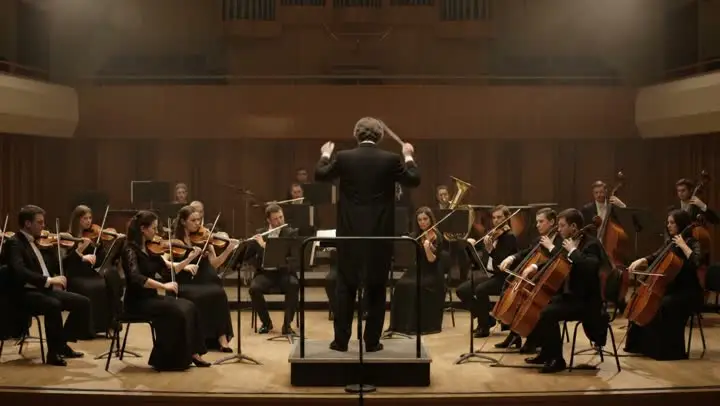
Orchestra cuts
Prompt: Musicians are playing in a concert as part of an orchestra. Every 1s cut to a close up of a different instrument. A consistent song plays throughout.
Settings and limits
Read live from the AgentReel model catalog, so this table always matches the generator.
| Developer | |
|---|---|
| Type | AI video model |
| Input | Text prompt, or up to 2 reference images |
| Prompt length | Up to 20,000 characters |
| Aspect ratios | 16:9, 9:16 |
| Resolution | 720p, 1080p, 4k |
| Duration | 4s, 6s, 8s, 10s |
| Credits | 16–53 credits per generation |
Price in credits for every setting
The credit cost of every setting combination. The Generate button always shows the exact price before you spend anything.
| Resolution | Duration | Text prompt |
|---|---|---|
| 720p | 4s | 16 |
| 720p | 6s | 21 |
| 720p | 8s | 27 |
| 720p | 10s | 32 |
| 1080p | 4s | 16 |
| 1080p | 6s | 21 |
| 1080p | 8s | 27 |
| 1080p | 10s | 32 |
| 4k | 4s | 37 |
| 4k | 6s | 42 |
| 4k | 8s | 48 |
| 4k | 10s | 53 |
How it compares with the other AI video models
Every model in the same generator, with its developer and credit range. Prices come from the same catalog the generator uses.
| Model | Developer | Credits |
|---|---|---|
| Veo 3.1Pro | 8–93 | |
| Seedance 2.5New | ByteDance | 35–593 |
| Kling 3.0Hot | Kuaishou | 11–102 |
| Kling 3.0 Omni | Kuaishou | 18–87 |
| Gemini Omni Video | 16–53 | |
| Gemini Omni 1.1 Flash (This page)New | 16–53 | |
| Seedance 2.0 | ByteDance | 24–383 |
| Wan 3.0New | Alibaba | 10–120 |
| Runway | Runway | 3–8 |
| MiniMax H3 | MiniMax | 12–49 |
| Hailuo 2.3 | MiniMax | 8–23 |
| Wan 3.0 Prime | Alibaba | 16–189 |
| Kling 3.0 TurboFast | Kuaishou | 23–85 |
| Seedance 2.0 FastFast | ByteDance | 15–93 |
| PixVerse V6 | PixVerse | 7–69 |
| HappyHorse 1.1 | HappyHorse | 29–109 |
| Vidu Q4 | Vidu | 9–77 |
| Wan 2.7 | Alibaba | 20–90 |
| Grok Imagine Video 1.5 | xAI | 4–17 |
| Grok Imagine VideoFast | xAI | 4–30 |
4K output
Render at 720p, 1080p, 4k. It is one of the few models in the generator with a 4K setting, so a finished shot holds up on a large monitor, a projector or a cropped edit.
First and last frame control
Add up to 2 images: the first opens the clip, the second sets where it lands. The model fills in the motion between them in the frame you choose.
Short, precise lengths
Pick 4s, 6s, 8s, 10s. Four seconds is enough for a reveal or a transition; ten seconds holds a short scene. Lengths are fixed steps, so the price never surprises you.
Same price at 720p and 1080p
The price depends on the length, and 720p and 1080p cost the same per clip. Only 4K costs more. That makes 1080p the sensible default for almost every clip.
How to generate a clip with Omni Flash
Open the generator
Click the button on this page; the AI video generator opens with the Flash model selected.
Prompt and frames
Write the shot in up to 20,000 characters and, if you like, upload a first frame or a first and a last frame.
Choose frame, length and resolution
Pick 16:9, 9:16, 4s, 6s, 8s, 10s and 720p, 1080p, 4k. The Generate button shows the exact price before you start.
Good uses
Transitions between two images
Give a before and an after picture, a sketch and a finished design, or two product colours, and let the clip move from one to the other.
4K hero and website clips
Make a short loop for a landing page header or a presentation opener that stays sharp on large screens.
Vertical clips for short-form feeds
Render 9:16 at 1080p for Reels, Shorts and TikTok, then add captions and cuts in the AI video editor.
Quick cuts and montage beats
Four- and six-second clips are ideal building blocks for fast montages assembled in the AI B-roll editor.
Omni Flash guide: frames, resolution and cost
Flash or Omni Video?
AgentReel offers two Omni models from Google: Gemini Omni Video and Gemini Omni 1.1 Flash. They share the frames (16:9, 9:16), the lengths, the resolutions and the price per clip. The difference is how they use images: Flash treats up to 2 uploads as a first and a last frame, while Gemini Omni Video accepts up to seven reference images that guide the look of the whole clip.
Choose Flash when you know where the shot should start and end. Choose Omni Video when you want several references, such as a character, an outfit and a location, to appear together.
Writing the prompt
Keep to one scene and spell out the camera: "close-up of a barista pouring latte art, slow push in, soft window light, shallow depth of field". Name the subject, the action, the place and the light before you add style words.
The limit is 20,000 characters, which leaves room for detail, but a short, concrete prompt usually beats a long one. If you need several scenes, write several prompts and join the clips afterwards.
Using a first and last frame
Two frames give the most predictable result. Make both images the same shape as the frame you will render, keep the subject roughly in the same place and describe the movement that connects them: "the camera circles the sneaker as it changes from white to red".
You can create matching frames in the AI image generator, for example with Nano Banana Pro, and then animate them here. With only a first frame, the clip starts from your picture and the prompt decides where it goes.
Which resolution to pick
Because 720p and 1080p cost the same, render at 1080p unless you have a reason not to. Use 4K only for clips that will be shown large or cropped hard, since it carries a clearly higher price at every length.
Judge the motion before the sharpness. If a 1080p take moves the wrong way, a 4K render of the same prompt will not fix it; change the prompt or the frames first.
What a clip costs
A clip costs 16 to 53 credits: the length sets the price, and 4K adds a surcharge. Every combination is in the price table on this page, the Generate button shows the amount before it is charged, and a failed task is refunded automatically.
Pay with credits from a plan or credit pack. Free credits cover Z-Image, video templates and Code to Video only. See the credits and pricing guide for details.
Compared with other models
Veo 3.1, also from Google, is the other 4K option and always renders sound with a fixed length. MiniMax H3 offers 2K and more frames, and Grok Imagine 1.5 is a low-cost way to draft at 480p or 720p. The model overview lists every model with its price range.
Where to use it
AI video generatorPick Gemini Omni 1.1 Flash in the model menu, write a prompt, add frames if you want and generate.Related models
Frequently asked questions
What is Gemini Omni 1.1 Flash?
How much does the Flash model cost?
Is it free to try?
Does it support 4K?
Which aspect ratios can I use?
How many images can I upload?
How is it different from Gemini Omni Video?
Where do my clips go?
Generate a 4K clip with Omni Flash
Open the generator with the model already selected and see the exact price first, or compare it with every other AI video model.
Open the video generator